How to pay for GPU rental with USDT or Bitcoin, step by step
Crypto is the only way to pay for GPUs here, and most lost payments come from the network, the fee or the address, not from the checkout. This guide covers the sending side: which network to choose, what your wallet needs, and how to make the exact amount arrive.
To pay for GPU rental with USDT, pick a block of GPU-hours, choose USDT on Tron (TRC-20) or on Ethereum (ERC-20) at checkout, and send the exact amount shown to the address shown within 30 minutes. With Bitcoin the steps are the same on the Bitcoin network. Then click "I've sent the payment". USDT on Tron is usually credited in about a minute, on Ethereum in two to three minutes, and Bitcoin in about 20 minutes. Keep a little TRX or ETH in your wallet for the network fee, and add the fee on top of the amount.
USDT on Tron, USDT on Ethereum or Bitcoin?
| USDT on Tron (TRC-20) | USDT on Ethereum (ERC-20) | Bitcoin | |
|---|---|---|---|
| Confirmations we wait for | 20 | 12 | 2 |
| Usual wait | About 1 minute | About 2 to 3 minutes | About 20 minutes |
| Network fee paid in | TRX, or staked energy | ETH (gas) | BTC, set by your wallet |
| Price moves while you pay | No, pegged to the dollar | No, pegged to the dollar | Yes; the amount is held for 30 minutes |
| Good for | Most payments, from an exchange or a Tron wallet | Wallets that already hold ETH for gas | Holders of Bitcoin, larger blocks |
Confirmation counts from our checkout settings on 19 November 2026. USDC on Ethereum works like USDT on Ethereum. All seven coins, Monero and Solana included, are listed on paying for a GPU with crypto.
Paying for GPU-hours step by step
Screens captured on 19 November 2026 from our client area on a local test setup, during a real order for a 12-hour H100 block.
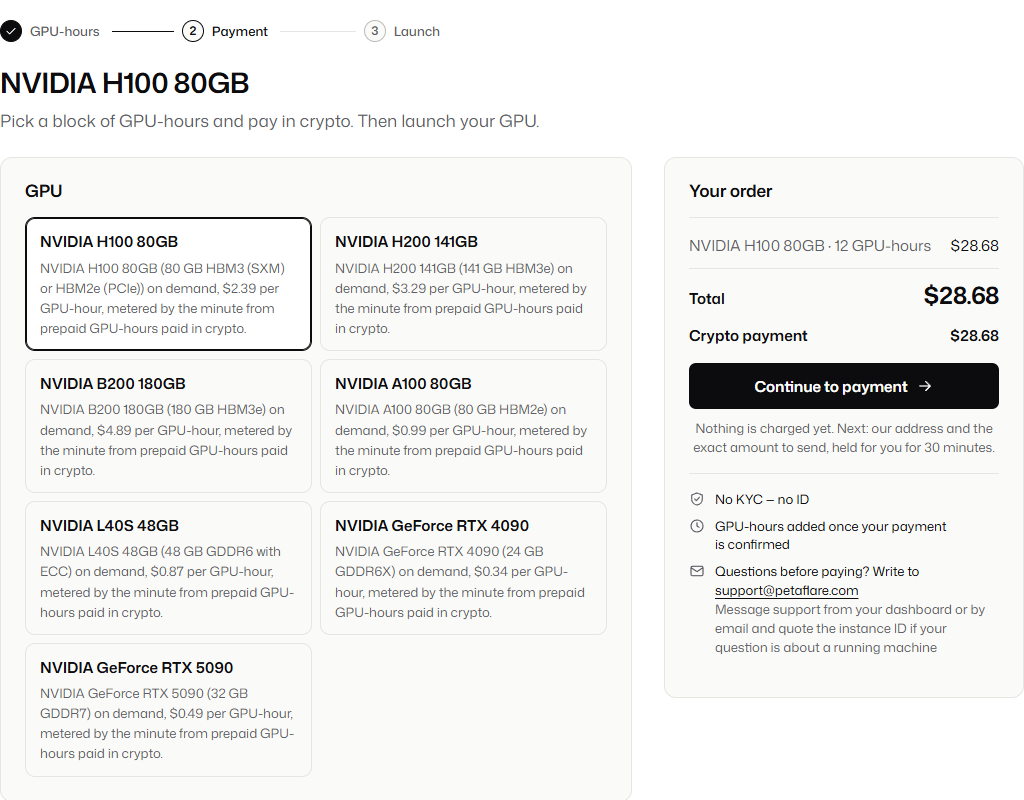
Pick the card and the block
Choose a GPU and one of its four blocks of hours, all listed on the price list. The price is in US dollars; the crypto amount comes on the next screen.
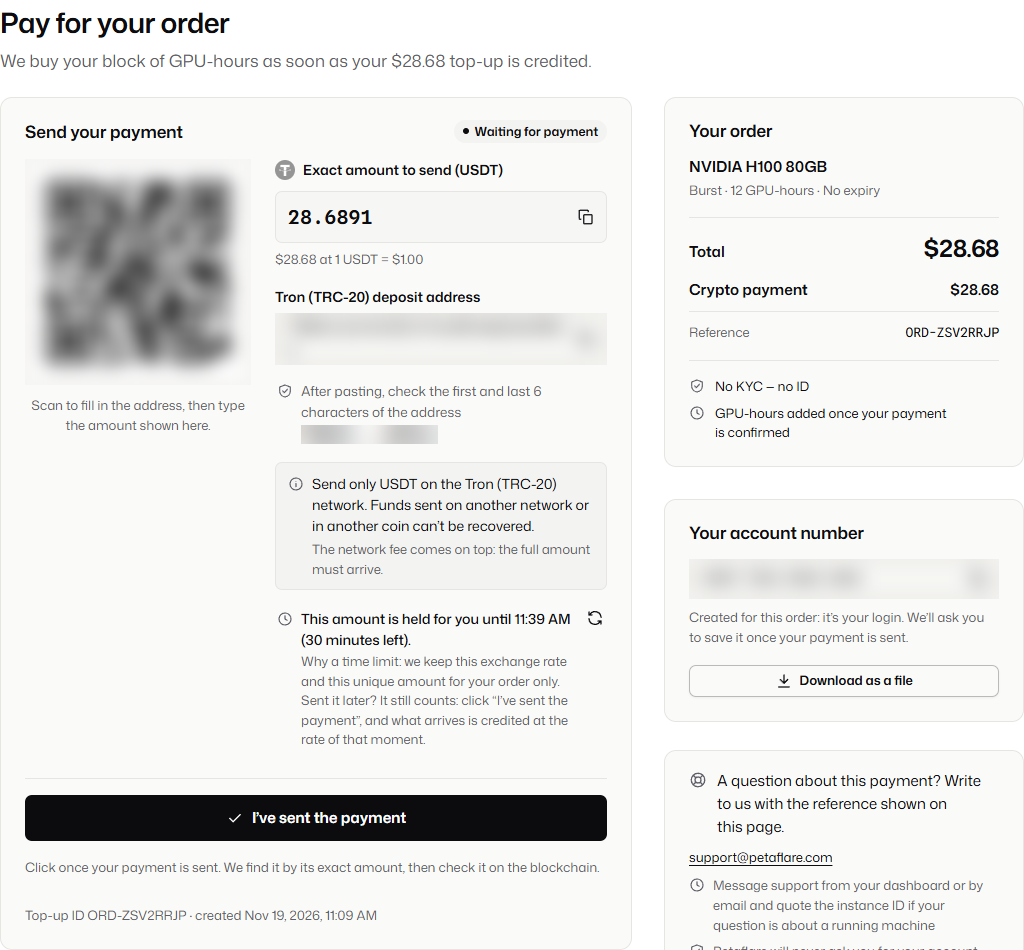
Choose the coin and its network, then send
Select USDT on Tron, USDT on Ethereum or Bitcoin. Copy the amount, which has four decimals so it belongs to your order only, and the address, or scan the QR code. Send from your wallet before the 30-minute timer ends, then click "I've sent the payment".
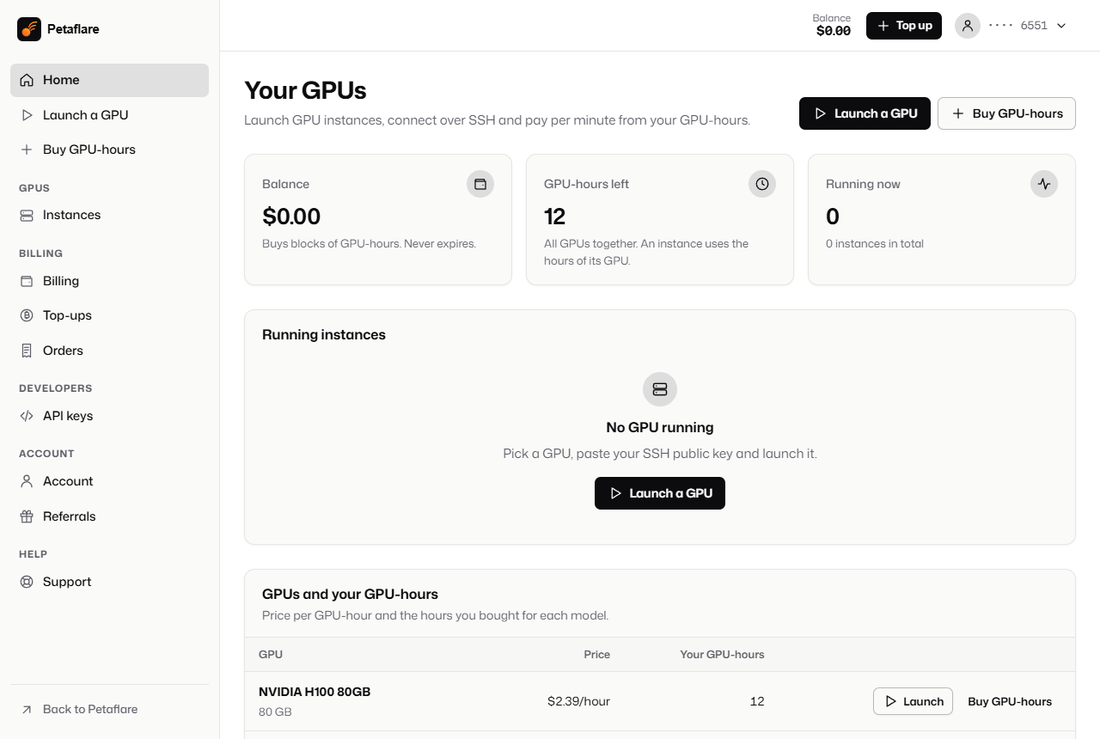
Wait for the confirmations
The page shows when the transfer is found and when it has its confirmations. The GPU-hours then appear in your dashboard, ready to launch a machine with your SSH key.


Sending USDT or Bitcoin from an exchange
Paying straight from an exchange account works, with two checks on the withdrawal screen.
- Pick the matching network. For USDT, choose Tron (TRC20) or Ethereum (ERC20), whichever you selected at checkout. Exchanges also offer USDT on BNB Chain, Solana, Polygon and others; those are not credited here.
- Make the arriving amount equal the checkout amount. Most exchanges take their withdrawal fee out of the amount you type and show the amount that will be received. Raise the figure until the received amount matches ours to the last decimal.
Withdrawals can sit in an exchange's own review queue before they reach the blockchain. If yours is held past the 30-minute window, the coins still count when they land, valued at the rate of that moment. Paying from an exchange also ties the payment to the identity you gave it; withdrawing to your own wallet first avoids that.
Keep fuel in your wallet for the fee
Each network charges its fee in its own coin, and a wallet holding only USDT cannot pay it.
- Tron. Sending USDT calls a smart contract, which uses energy. Without energy from TRX you have staked or been delegated, the network burns TRX from your wallet instead, so keep some TRX next to your USDT.
- Ethereum. Every transfer, USDT included, pays gas in ETH. The wallet shows the estimate before you confirm.
- Bitcoin. The fee comes out of your BTC and depends on how busy the network is; most wallets let you pick a fee level. Leave any "subtract fee from amount" option unticked, or less than the amount shown will arrive.
The Bitcoin side, including when its fee matters on a small block, is covered on the Bitcoin GPU server page.
Mistakes that cost money, and how to avoid them
| Mistake | What happens | How to avoid it |
|---|---|---|
| USDT sent on another network | Not credited automatically; getting it back is not always possible | Choose Tron or Ethereum, the one picked at checkout |
| Exchange fee taken out of the amount | Too little arrives and the order waits for the rest | Check the received amount on the withdrawal screen |
| Address copied from your wallet history | Coins can go to a look-alike address planted by scammers | Copy the address from the payment page every time and check its first and last characters |
| Same payment sent twice | Treated as an overpayment, which stays on your account balance | Wait for the page to show the first transfer before sending again |
| Payment sent after 30 minutes | Still counted, at the rate when it lands | Start a new checkout if the timer has run out and you have not sent yet |
How mismatched payments are settled is set out on the refunds page.
USDT and Bitcoin payment questions
Can I pay with USDT on BNB Chain, Solana or Polygon?
No. USDT is credited on Tron and Ethereum only. Solana itself is accepted as SOL, not as USDT.
Why does my Tron wallet refuse to send USDT?
Usually because it lacks TRX for the energy the transfer needs. Add a little TRX to the same wallet and try again.
Do I need an account before paying?
No. A 16-digit account number is created with your first order and works as your login; an email address is optional.
Can I pay with Monero instead?
Yes. Monero follows the same steps with 10 confirmations; see the Monero GPU server page.
Sources
- TRON developer docs, resource model (energy and TRX burning)read 19 November 2026
- ethereum.org, gas and feesread 19 November 2026
- Bitcoin, how block confirmations work (bitcoin.org)read 19 November 2026